
Paste a link, get your eBay listing.
From the product page we prepare the title, category, item specifics, HTML description and main image. Most listings are ready in under 30 seconds. You check it and publish it from your own eBay account.
Free sign-up No card required Your eBay account isn't connected
5 free tokens for the first 100 accounts — that's 5 listings.
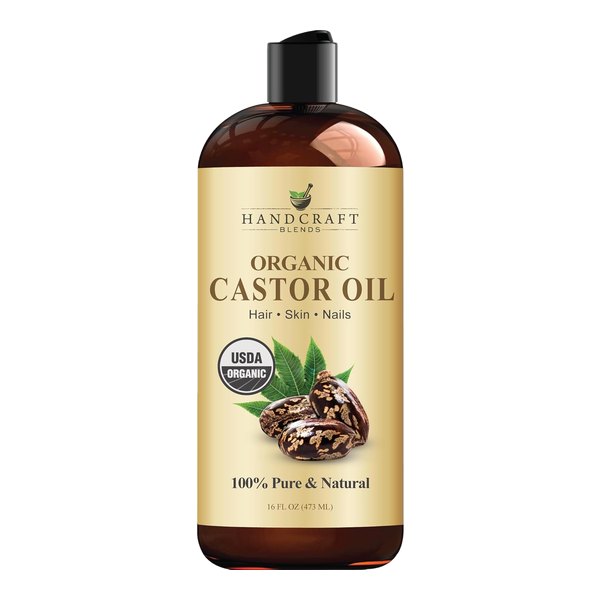
+2 more titles. The brand name is kept out of the titles.
| Type | Moisturizer |
| Hair Type | All Hair Types |
| Ingredients | Castor Oil |
| Styling Effect | Moisturizing, Nourishing, Conditioning |
| Active Ingredients | Ricinoleic Acid |
| Features | Organic, Alcohol Free, Paraben-Free, Silicone-Free, Sulfate-Free |
| Volume | 16 fl oz |
Transferred to the eBay form in one click with the free extension.
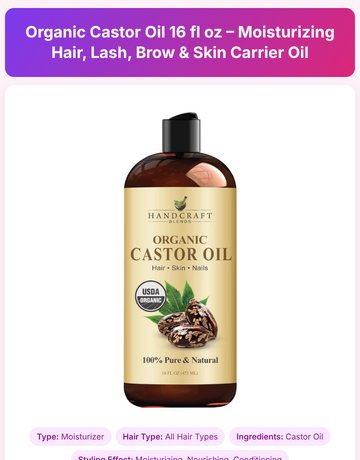
Written by AI · one of 10 designs · See it all →
A listing in three steps
We prepare the listing, you make the final call.
Paste the product link
Paste the address of the Amazon or Walmart product page into the box.
Check what's prepared
Pick one of the five titles, look over the category and item specifics. Change any field you don't like.
Move it to eBay
Copy the title and description, fill in the item specifics with the extension, download the images. Publish the listing from your own account.
One link, six pieces
You can copy each piece separately and change whatever you like.
5 titles
Five options written for eBay's 80-character limit. The brand name stays out of the title.
Category
Three suggestions from eBay's own category list, with their category IDs.
Item specifics
The fields the category asks for are filled from the product data. Our free Chrome extension types them into the eBay form for you.
HTML description
Pick one of 10 designs or get a different one for each listing. Enter your store name and eBay username, and a store block and a Shop Now button are added to the description.
Main image
The background is removed and the main image is made on a background that suits the product. You download the other images as a ZIP in one click.
VeRO check
The title and brand are compared with the brands on the VeRO list. If the brand is listed, Brand is set to Unbranded.
I've been dropshipping on eBay for five years. I've listed 500 products in my stores in total and made more than 30,000 sales. I didn't list many products, but I picked each one carefully and worked on its title, description and photos one by one.
Preparing a listing like that by hand took me about an hour. On DropQuill the same listing is usually ready in under 30 seconds.
Your eBay account stays yours alone
DropQuill never connects to your eBay account in any way. You don't give us your eBay password, API access or session data.
You copy the listing and publish it from your own account. You decide what happens in your account.
- Sign in
- Publish or delete listings
- Change your prices
- Read your messages
Find a product that sells in the product pool
Our product finder scans hundreds of products every day. Each product that enters the pool is either analyzed by AI or checked one by one by our founder. Before buying you see the category, the Amazon price range, the estimated profit and the last 30 days of eBay sales.


Updates as products are added to the pool. The product's name and link are revealed after you buy.
Pay as you go
No subscription. One listing is 1 token; products in the product pool are 1, 2 or 4 tokens.
- Valid for 30 days
- Refund within 14 days if unused
When you press “Buy tokens”, a ready-made order message opens in your email.
Try without signing up
These tools are free. Sign up and your daily limit goes up.
VeRO check
Paste up to 100 titles and brands on the VeRO list get flagged. The list is updated every month.
Main image tool
Removes the background, places the product on a 1600×1600 white background and clears the image metadata.
Profit calculator
Shows your profit and suggested sale price after eBay fees, sales tax and VAT.
Chrome extensions
Item Specifics Autofill, Profit Calculator & Sales History, Address Paster. All three are free.
FAQ
Why should I use DropQuill?
Time. Preparing a listing by hand (title, item specifics, category, description, photos) can take an hour; on DropQuill the same listing is ready from one link, usually in under 30 seconds. Finding products that sell also takes hours: the product pool has products checked by an expert or by AI, with the profit already calculated. The tools come from the daily work of a seller who made more than 30,000 sales with 500 products.
How long does a listing take?
Most listings are ready in under 30 seconds. If the source site responds slowly it can take a bit longer; you can leave the page meanwhile, and the listing appears on My listings when it's ready.
Do I need to connect my eBay account?
No. DropQuill never accesses your eBay account, neither by API nor by password. You copy the listing yourself or transfer it to the eBay form with the extension.
Which sites' links work?
Amazon, Walmart, Sam's Club, Home Depot, Target and Costco (US). For other sites you can enter the product information by hand.
How many tokens is a listing?
1 token. Products in the product pool are 1, 2 or 4 tokens; add the listing for +1 token. The main image tool, VeRO check, calculator and extensions are free.
Do tokens expire?
Each package is valid for 30 days from the day you buy it. Tokens closest to expiry are spent first. Gift tokens are valid for 14 days.
If something goes wrong, do I lose my token?
No. If there is a technical error, the token is returned automatically.
How do I pay?
Online payment is coming soon. For now, write to us with the “Buy tokens” button under the package; your tokens are added after payment.
Can I get a refund?
Yes, for a completely unused package within 14 days of purchase.
Is a listing prepared for the product I buy from the product pool?
If you want. Tick “Prepare the listing too” when buying and the listing is prepared with the product for +1 token. If you don't, you can prepare it any time from My purchases for 1 token.
Prepare your first listing with a gift token
Paste the link and sign up. Once you confirm your email, the listing is prepared automatically.